


How Exness Terminal makes trading across web and mobile easier

Trading doesn't always happen from the same place. You might analyze the markets from your computer in the morning, check your positions on your phone during the day, and return to your desktop later.
Exness Terminal is designed to support that flexibility, letting you trade on the go.
In this article, you’ll learn how Exness Terminal helps you trade across web and mobile, giving you access to your positions, trading tools, and account features from either device.
Trade seamlessly across web and mobile
Moving between devices shouldn’t change the way you trade. Exness Terminal brings together trading, market analysis, and account management in one place, helping you stay focused on the markets.
Whether you're monitoring positions, placing trades, or managing your funds, you can choose the device that best suits the moment without changing your overall trading workflow.
What you can access across web and mobile
Whether you’re at your desk or on the move, the key tools and features you need are available on either device. Exness Terminal currently only supports Exness platform-based accounts and MT5 accounts, including Pro account types.
Manage your funds | Monitor your positions | Place and manage trades | Analyze the markets |
Deposit and withdraw funds without leaving the platform. | Keep track of your trades and respond to market movements. | Open new positions or modify and close existing positions. | Use built-in charting tools and technical indicators to identify trading opportunities. |
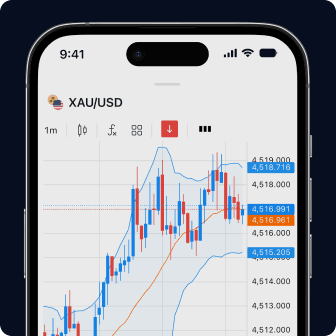
Every tool you need, all in one place
Chart, trade, and manage your funds—all from one user-friendly screen.
More than a trading platform
Exness Terminal includes a range of built-in features designed to support different trading styles and workflows.
- Advanced charting with 100+ indicators, 50 drawing tools, and chart templates for market analysis.
- Multi-chart mode for monitoring up to eight instruments simultaneously on the web.
- Risk Manager on Chart for setting stop loss and take profit directly on the chart, choosing risk by price, pips, funds, or equity percentage, and managing multiple positions in one action.
- One-click trading lets you place orders faster when market conditions change.
Together, these features help you analyze the markets, manage risk, and execute trades without leaving the platform.

Get started trading across web and mobile
Getting started is simple. Use Exness Terminal when trading from your web browser, and the Exness Trade app when trading from your mobile device.
Sign in with the same account to access your Exness platform-based accounts and MT5 trading accounts across both trading platforms.
If you're new to Exness Terminal, you can also explore its features with a demo account before trading with real funds. This allows you to get familiar with the platform and practice using its tools before moving to live trading.
Key takeaways
- Exness Terminal helps you trade across web and mobile by giving you access to your MT5 trading accounts from either device.
- Monitor positions, place trades, analyze the markets, and manage your funds wherever you trade.
- Exness Terminal combines trading, market analysis, and account management, helping reduce the need to switch between different platforms.
- Use Exness Terminal in your web browser and the Exness Trade app on your mobile device with the same Exness account.
FAQ
How do I sync web and mobile trading with Exness Terminal?
To trade across web and mobile, sign in to Exness Terminal and the Exness Trade app using the same Exness account. You'll be able to access your MT5 trading accounts from both platforms, making it easier to monitor positions, place trades, and manage your account wherever you are.
Exness Terminal currently only supports Exness platform-based accounts and MT5 trading accounts.
Does Exness Terminal sync positions in real time between devices?
Your open positions and pending orders reflect the current state of your MT5 trading accounts, allowing you to monitor and manage your trades across web and mobile.
Do my chart layouts and indicator settings carry over from web to mobile?
Chart layouts and technical indicator settings are configured separately in Exness Terminal and the Exness Trade app. Both platforms provide charting and analysis tools, but you'll need to set up your preferred layouts and indicators on each platform.
Can I deposit and withdraw from the same place I trade?
Yes. Exness Terminal lets you deposit and withdraw funds without switching to a separate platform.
What's the difference between Exness Terminal and the Exness Trade app?
Exness Terminal is Exness' web trading platform, designed for trading in your browser. For mobile trading, you can use the Exness Trade app. Sign in with the same account to access your Exness platform-based accounts and MT5 trading accounts on both platforms.
This article does not constitute investment advice. Past performance is not indicative of future results. The information, data, prices, and market conditions presented in this article are accurate as of the publication date and may change over time. Your capital is at risk. Please trade responsibly.